Windows 11 gets customizable right-click menu in Beta channel
Microsoft added a customizable context menu to Windows 11 Insider Beta, letting users toggle commands, move items and choose which apps appear in the main menu or a submenu. A full rollout to all Windows 11 users could arrive before the end of the year.
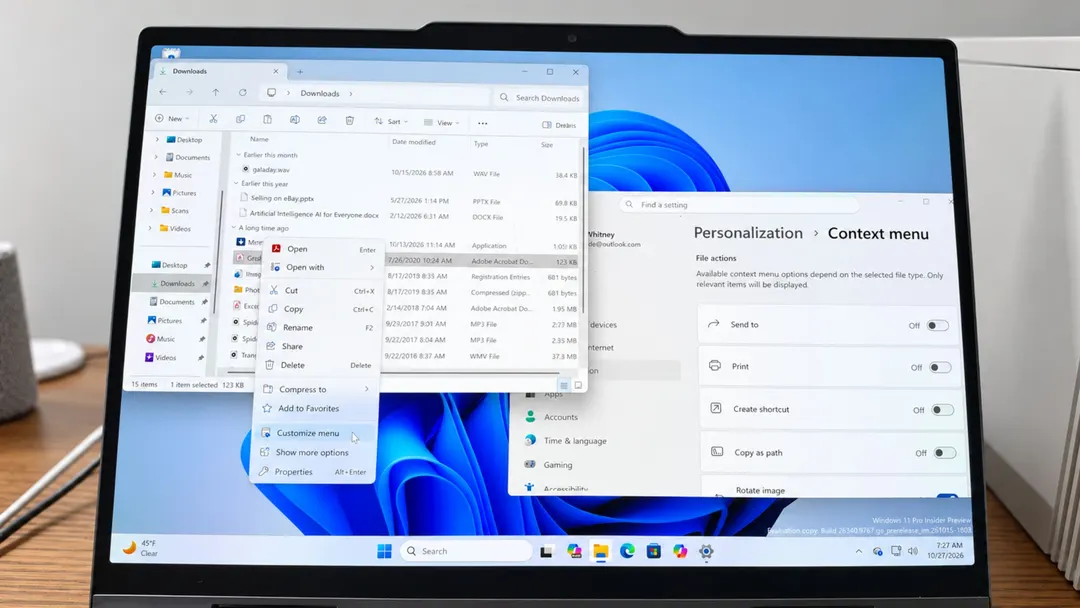
- Settings are reachable via right-click or Settings → Personalization → Context menu
- Users can hide Send to, Print, Create shortcut, Copy as path and Rotate image
- Copilot, Notepad, Paint, Photos and third-party apps can go into a submenu
- Cut, Copy, Paste, Rename and Delete can sit at the top or inside the menu
Read next
Software